
Roll over image to zoom in
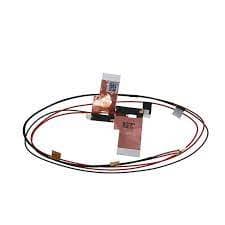
Dell Alienware M17 R3 M17 R4 antenna Wireless WIFI signal line 04TV40
BrandDell
SKU:LVDSCR1111
4.3(4 ratings)
• Product Type : Laptop LED Screen Display Cable
• Brand : Dell
• Model : Dell Alienware M17 R3 M17 R4
• Compatible with : Dell Alienware M17 R3 M17 R4
• Product Number : 04TV40
• Brand : Dell
• Model : Dell Alienware M17 R3 M17 R4
• Compatible with : Dell Alienware M17 R3 M17 R4
• Product Number : 04TV40
Details
2 specificationsItem Type
Screen Vedio Cable
Weight
0.13
Product details
Technical specifications and additional product information
Technical details
◆Brand
Dell
◆Category
Laptop Screen Cable
◆Item Type
Screen Vedio Cable
◆Weight
0.13
Additional information
◆SKU
LVDSCR1111
◆Availability
Out of Stock
Loading recommendations...
Description
Full product information and detailed features
Introducing the Dell Alienware M17 R3 M17 R4 Antenna Wireless WIFI Signal Line (04TV40) – the essential component for restoring your laptop's connectivity and performance. Designed specifically for Dell Alienware models, this high-quality antenna ensures a reliable and strong wireless signal, allowing you to enjoy seamless browsing, gaming, and streaming experiences.
Product Specifications and Compatibility:
• Product Type: Wireless WIFI Signal Line
• Brand: Dell
• Model Compatibility:
• Dell Alienware M17 R3
• Dell Alienware M17 R4
• Product Number: 04TV40
This antenna is a perfect fit for your Dell Alienware M17 R3 and M17 R4, ensuring compatibility and optimal performance.
Quality and Authenticity Details:
Rest assured that you are purchasing an original OEM product. The Dell Alienware M17 R3 M17 R4 Antenna is manufactured to meet the highest standards of quality and performance, providing you with a reliable replacement that guarantees durability and longevity.
Key Features and Benefits for Egyptian Users:
• Enhanced Connectivity: Experience improved WIFI signal strength, reducing interruptions during online activities.
• Easy Installation: Designed for straightforward installation, making it accessible even for those with minimal technical skills.
• Reliable Performance: Built to withstand the rigors of daily use, ensuring your laptop remains connected when you need it most.
Installation and Usage Information:
Installing the Dell Alienware M17 R3 M17 R4 Antenna is simple. Follow the included instructions to replace your old antenna quickly, restoring your laptop’s wireless capabilities in no time. Ensure that your laptop is powered off and unplugged before beginning the installation process for safety.
Warranty and Support Details:
We stand behind the quality of our products. The Dell Alienware M17 R3 M17 R4 Antenna comes with a warranty that covers manufacturing defects, giving you peace of mind with your purchase. Our customer support team is readily available to assist you with any questions or concerns.
Why Choose This Product for Your Egyptian Laptop Repair Needs:
Choosing the Dell Alienware M17 R3 M17 R4 Antenna means investing in a product that enhances your laptop's performance while ensuring compatibility and quality. It is an ideal choice for users looking to maintain their device’s functionality without compromising on quality.
Fast Delivery Across Egypt:
We understand the urgency of getting your laptop back in working order. That’s why we offer fast delivery services across Egypt, including major cities like Cairo, Alexandria, and Giza. Order today and enjoy a reliable wireless connection in no time!
Enhance your laptop's performance with the Dell Alienware M17 R3 M17 R4 Antenna Wireless WIFI Signal Line and experience the difference in connectivity and speed.
Product Specifications and Compatibility:
• Product Type: Wireless WIFI Signal Line
• Brand: Dell
• Model Compatibility:
• Dell Alienware M17 R3
• Dell Alienware M17 R4
• Product Number: 04TV40
This antenna is a perfect fit for your Dell Alienware M17 R3 and M17 R4, ensuring compatibility and optimal performance.
Quality and Authenticity Details:
Rest assured that you are purchasing an original OEM product. The Dell Alienware M17 R3 M17 R4 Antenna is manufactured to meet the highest standards of quality and performance, providing you with a reliable replacement that guarantees durability and longevity.
Key Features and Benefits for Egyptian Users:
• Enhanced Connectivity: Experience improved WIFI signal strength, reducing interruptions during online activities.
• Easy Installation: Designed for straightforward installation, making it accessible even for those with minimal technical skills.
• Reliable Performance: Built to withstand the rigors of daily use, ensuring your laptop remains connected when you need it most.
Installation and Usage Information:
Installing the Dell Alienware M17 R3 M17 R4 Antenna is simple. Follow the included instructions to replace your old antenna quickly, restoring your laptop’s wireless capabilities in no time. Ensure that your laptop is powered off and unplugged before beginning the installation process for safety.
Warranty and Support Details:
We stand behind the quality of our products. The Dell Alienware M17 R3 M17 R4 Antenna comes with a warranty that covers manufacturing defects, giving you peace of mind with your purchase. Our customer support team is readily available to assist you with any questions or concerns.
Why Choose This Product for Your Egyptian Laptop Repair Needs:
Choosing the Dell Alienware M17 R3 M17 R4 Antenna means investing in a product that enhances your laptop's performance while ensuring compatibility and quality. It is an ideal choice for users looking to maintain their device’s functionality without compromising on quality.
Fast Delivery Across Egypt:
We understand the urgency of getting your laptop back in working order. That’s why we offer fast delivery services across Egypt, including major cities like Cairo, Alexandria, and Giza. Order today and enjoy a reliable wireless connection in no time!
Enhance your laptop's performance with the Dell Alienware M17 R3 M17 R4 Antenna Wireless WIFI Signal Line and experience the difference in connectivity and speed.
Customer reviews & Top reviews
Genuine customer feedback with detailed ratings & helpful reviews
Customer reviews
4.3
out of 5
4 global ratings
5
25%
4
75%
3
0%
2
0%
1
0%
Review this product
Share your thoughts with other customers
Top reviews
Sort by
C
Customer
Verified Purchase12/21/2024
Review
0 found this helpful
C
Customer
12/21/2024
Review
0 found this helpful
C
Customer
12/21/2024
Review
0 found this helpful
C
Customer
Verified Purchase12/21/2024
Review
0 found this helpful